


Project management software is not just a luxury but a necessity, according to a report by MarketsandMarkets, the project management software market is expected to grow from $3.9 billion in 2020 to $8.0 billion by 2026, at a CAGR of 12.7%. This growth underscores the increasing reliance on these tools to streamline operations, enhance collaboration, and improve productivity.
Organizations need project management tools that can handle complex workflows, offer robust reporting capabilities, and scale with their growth. While Jira is a popular choice, several alternatives offer unique features tailored to different needs. In this article, we will explore the top 10 Jira competitors and alternatives for 2026.
1. Celoxis

Descripción general
Celoxis stands out as a top-tier enterprise project management software designed to cater to mid-size and large enterprise-level organizations. With a robust set of features, Celoxis provides a comprehensive solution for all project management needs, from planning and execution to monitoring and reporting. Its versatility and scalability make it an ideal choice for growing businesses.
Características principales
- Project Planning and Scheduling: Celoxis offers advanced project planning tools, including Gantt charts, task dependencies, and resource allocation, ensuring that projects are planned efficiently and accurately.
- Collaboration: With built-in collaboration features, teams can communicate seamlessly, share documents, and track progress in real-time.
- Customizable Dashboards: Celoxis allows users to create personalized dashboards, providing an at-a-glance view of key metrics and project status.
- Resource Management: Effective resource management tools help in optimizing the use of available resources, preventing over-allocation, and ensuring balanced workloads. Don’t Miss: The Importance of Resource Management Software in Project Management Offices (PMOs)
- Reporting and Analytics: Detailed reports and analytics provide insights into project performance, helping in making data-driven decisions.
- Scalability: As your business grows, Celoxis scales with you, accommodating more projects and users without compromising on performance.
- On-Premise Deployment: Unlike Jira, which is only available as a cloud-based solution, Celoxis offers an on-premise deployment option. This ensures complete control over your data, enhanced security, and compliance with regulatory requirements. On-premise deployment is ideal for organizations with stringent data security policies or those operating in highly regulated industries.
- Check Also:- Cloud-Based and On-Premise Project Management Software: A Comprehensive Guide
Why Celoxis?
Celoxis is more than just a project management tool; it’s a partner in your business growth. From setup to execution, Celoxis offers unparalleled support, ensuring that you can manage your projects efficiently and effectively. The on-premise deployment option provides added peace of mind by allowing full control over your data and ensuring compliance with industry-specific regulations. Whether you’re a mid-size company looking to expand or an enterprise with complex project needs, Celoxis adapts to your requirements, making it the perfect tool for long-term success.
- Also Check: What is Project Portfolio Management (PPM)?
También puedes consultar:
2. Monday.com

Descripción general
Monday.com is a highly visual and intuitive project management software that appeals to teams of all sizes. Its flexible platform allows for customization to fit various workflows and project types.
Make sure to check:
- Las 11 mejores alternativas y competidores de Monday.com en 2026
- Monday.com vs Celoxis: In-Depth Project Management Software Comparison
Características principales
- Visual Project Tracking: Use boards, timelines, and Gantt charts to track project progress visually. Must Check: Top Gantt Chart Software Tools for Project Managers in 2026
- Automation: Automate repetitive tasks and workflows to save time and reduce errors.
- Integrations: Connect with a wide range of tools, including Slack, Google Drive, and Dropbox.
- Collaboration: Enhance team collaboration with comments, mentions, and file sharing.
Why Monday.com?
Monday.com is ideal for teams that prioritize visual project management and require a high degree of customization. Its user-friendly interface and extensive integrations make it a versatile choice for various project management needs.
3. Asana

Descripción general
Asana is a popular project management software tool known for its simplicity and ease of use. It helps teams organize their work, track progress, and achieve their goals.
Características principales
- Task Management: Create, assign, and prioritize tasks with ease.
- Project Views: Multiple project views, including list, board, and calendar views.
- Workflow Automation: Automate workflows with custom rules and triggers.
- Reporting: Generate reports to gain insights into team performance and project status.
Why Asana?
Asana is perfect for teams that need a straightforward and intuitive project management solution. Its clean interface and powerful task management features help teams stay organized and productive.
4. Trello

Descripción general
Trello is a simple, flexible, and visual project management tool that uses boards, lists, and cards to help teams organize their work.
Características principales
- Kanban Boards: Visualize projects and tasks using Kanban boards.
- Power-Ups: Enhance Trello’s functionality with integrations and add-ons.
- Collaboration: Collaborate with team members through comments, attachments, and mentions.
- Mobile Access: Access your projects on the go with Trello’s mobile app.
Why Trello?
Trello is ideal for teams that prefer a visual approach to project management. Its simplicity and flexibility make it a great choice for small to medium-sized teams.
5. Smartsheet

Descripción general
Smartsheet is a powerful work management and automation platform that combines the best of spreadsheets, project management, and collaboration tools.
You May Also Check:
- Smartsheet vs Celoxis: software de gestión de proyectos
- Smartsheet vs ClickUp vs Celoxis: 2026 Comparison & Reviews
- Smartsheet vs. Excel vs. Celoxis: Project Management Comparison [2026]
Características principales
- Grid, Gantt, and Card Views: Multiple views to manage projects according to your preference.
- Automations: Automate workflows and repetitive tasks with ease.
- Integrations: Connect with popular tools like Microsoft Office, Google Workspace, and Slack.
- Reporting and Dashboards: Create comprehensive reports and dashboards for real-time insights.
Why Smartsheet?
Smartsheet is ideal for teams that need robust project management capabilities combined with the familiarity of spreadsheets. Its advanced automation and integration features make it suitable for complex projects.
6. Wrike
Descripción general
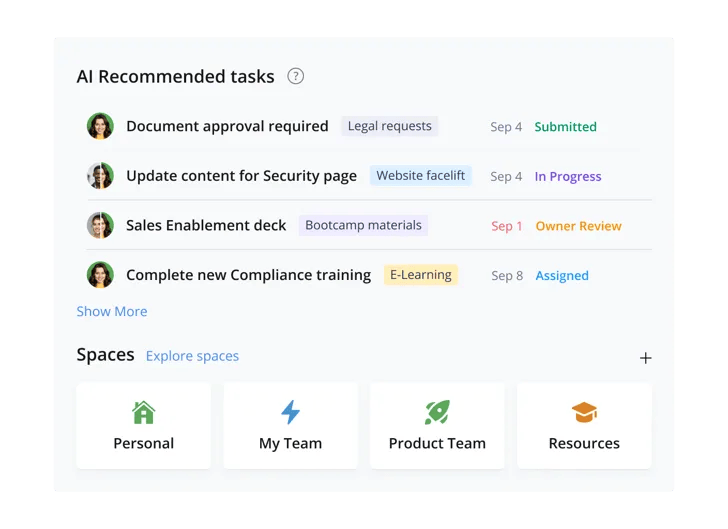
Wrike is a versatile project management tool designed for teams of all sizes. It offers a range of features to streamline project planning, execution, and reporting.
- También puedes consultar:
- 11 Best Wrike Alternatives & Competitors in 2026
- Wrike vs Trello vs Celoxis: ¿La mejor herramienta de gestión de proyectos?
- Wrike vs. Jira vs. Celoxis: ¿La mejor herramienta de gestión de proyectos?
Características principales
- Task Management: Create, assign, and track tasks with ease.
- Gantt Charts: Visualize project timelines and dependencies.
- Time Tracking: Track time spent on tasks and projects.
- Custom Workflows: Customize workflows to fit your team’s processes.
Why Wrike?
Wrike is a great choice for teams that need a flexible and comprehensive project management solution. Its customizable workflows and powerful task management features help teams stay organized and efficient.
7. Microsoft Project
Descripción general
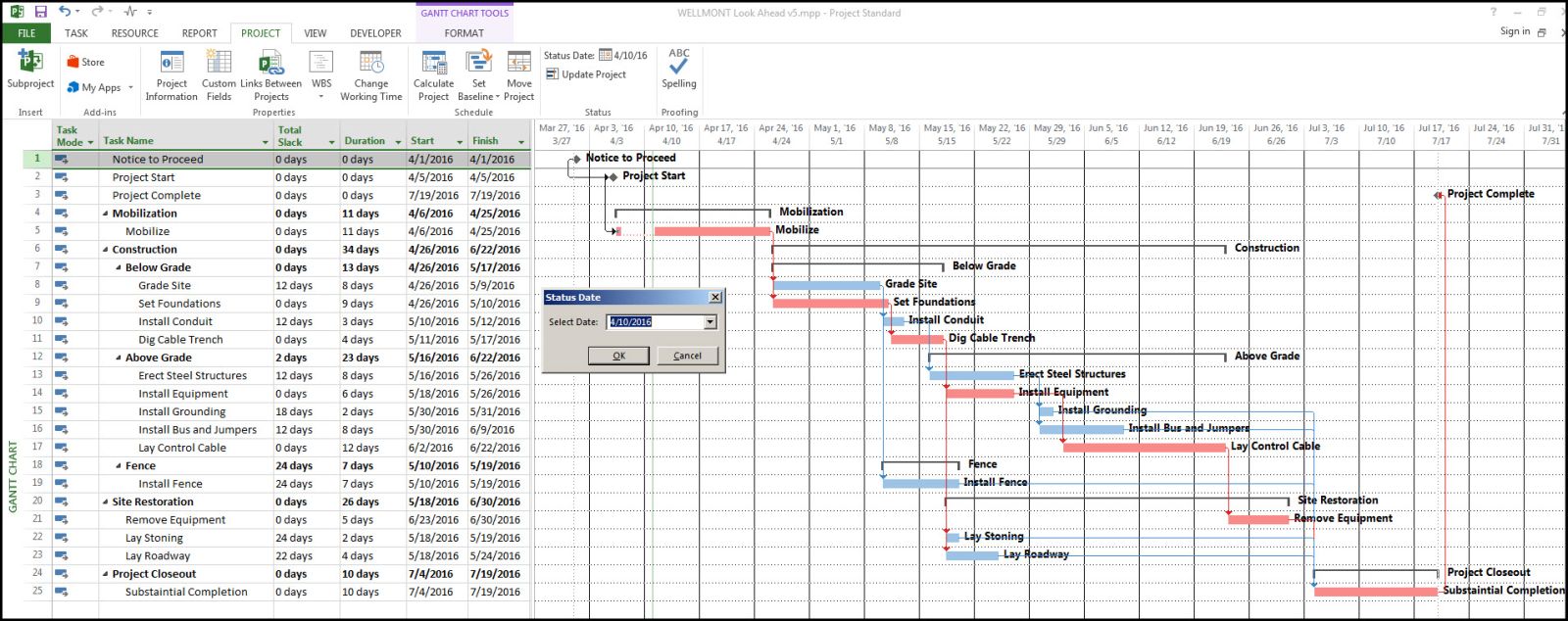
Microsoft Project is a well-established project management tool known for its extensive features and capabilities. It’s widely used by large organizations for managing complex projects.
También puedes consultar:
- Integración de Microsoft Project
- Best Microsoft Project Alternatives & Competitors
- Microsoft Planner vs. Project vs. Celoxis: ¿Qué herramienta es la mejor?
- 13 razones para no usar el software de gestión de proyectos de Microsoft
Características principales
- Advanced Scheduling: Plan and schedule projects with detailed timelines and dependencies.
- Resource Management: Allocate resources effectively to avoid overloading.
- Reporting: Generate detailed reports to monitor project performance.
- Integration: Integrate with other Microsoft tools like Office 365 and SharePoint.
Why Microsoft Project?
Microsoft Project is ideal for large organizations with complex project management needs. Its advanced scheduling and resource management features make it a powerful tool for managing large-scale projects.
8. Basecamp

Descripción general
Basecamp is a simple and effective project management tool designed for small to medium-sized teams. It focuses on collaboration and communication to keep teams aligned.
Características principales
- To-Do Lists: Create and assign tasks with due dates.
- Message Boards: Communicate with team members through message boards.
- Docs & Files: Store and share documents and files in one place.
- Automatic Check-Ins: Keep track of team progress with automatic check-ins.
Why Basecamp?
Basecamp is perfect for teams that prioritize collaboration and communication. Its straightforward interface and essential project management features make it easy to use and effective for small to medium-sized teams.
9. ClickUp

Descripción general
ClickUp is an all-in-one project management tool that offers a wide range of features to help teams manage their work efficiently.
Características principales
- Task Management: Create, assign, and prioritize tasks with multiple views.
- Docs: Create and collaborate on documents within ClickUp.
- Time Tracking: Track time spent on tasks and projects.
- Integrations: Connect with popular tools like Slack, Google Drive, and more.
Why ClickUp?
ClickUp is ideal for teams that need a comprehensive project management solution with a wide range of features. It’s an all-in-one platform that helps teams stay organized and productive.
10. Businessmap

Businessmap is built to support enterprise-wide project and portfolio management with integrated workflow execution. The platform connects portfolio initiatives, team-level work, and OKRs in one unified platform.
Características principales
- Portfolio Management & OKRs: connect strategic initiatives and daily execution in a single environment.
- Workflow Automation: sync work across board using trigger-based rules.
- Advanced metrics and management dashboards: track real-time delivery progress, identify bottlenecks and measure work performance.
- Document Management: Store, manage and project-related documentation in one place.
Why Businessmap?
Businessmap is a lightweight and cost-efficient solution, ideal for organizations that need executive visibility and cross-department alignment. The platform provides enterprise scalability and security features without requiring additional add-ons or hidden costs.
11. Teamwork
Descripción general
Teamwork is a project management software designed for teams that need to manage multiple projects simultaneously. It offers a range of features to streamline project management and improve collaboration.
Características principales
- Task Management: Create, assign, and track tasks with ease.
- Time Tracking: Track time spent on tasks and projects.
- Gantt Charts: Visualize project timelines and dependencies.
- Client Access: Provide clients with access to projects and progress updates.
Why Teamwork?
Teamwork is ideal for teams that need to manage multiple projects and clients. Its comprehensive features and client access capabilities make it a powerful tool for improving project management and collaboration.
Conclusión
Choosing the right project management software is crucial for the success of your projects and overall business efficiency. While Jira is a powerful tool, exploring alternatives can lead to finding a better fit for your specific needs. There is a wide range of options available to suit different project management styles and requirements.
Beyond task tracking, successful project delivery depends on continuous performance measurement and learning, This is why many teams invest in monioring and evaluation training to strengthen reporting, accountability, and data-driven decision-making alongside their project management tools.
También puedes consultar:
- Best IT Project Management Software & Tools in 2026: A Comprehensive Guide
- Best Project Management Software To Increase Productivity
- Las mejores herramientas de software de gestión de proyectos para equipos remotos
Investing in the right project management tool can transform the way you manage projects, enhancing productivity, collaboration, and ultimately, your bottom line. Consider your team’s needs, project complexity, and business goals when selecting the perfect tool to ensure successful project outcomes in 2026 and beyond.


Comentarios
0 respuestas