
Créer un jeton d'accès
Générez un jeton Celoxis pour MCP
- Ouvrir le guide de l'API
- Ouvrir Celoxis.
- Cliquez sur le Profil en haut à droite.
- Sélectionnez l'API.
- Sur la page du guide de l'API Celoxis v2, cliquez sur Générer un jeton d'accès.
- Créer le jeton
La « Votre jeton d'accès API » s'ouvre.
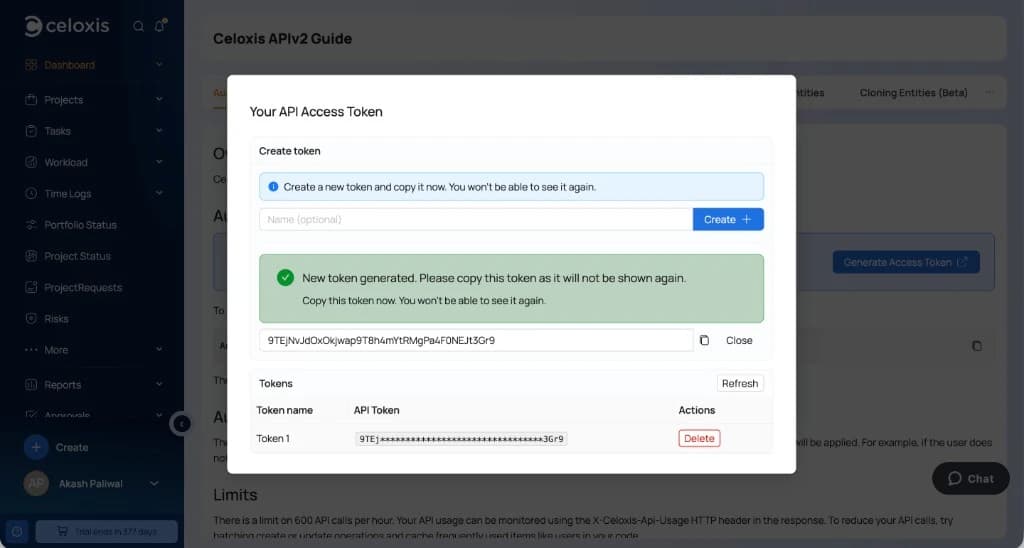
- Vous pouvez éventuellement saisir un nom (par exemple, ChatGPT MCP).
- Cliquez sur Créer +.
- Copiez immédiatement le jeton. Celoxis n'affiche le jeton complet qu'une seule fois.
- Cliquez sur Fermer.
Si vous recevez un message vous demandant de contacter un administrateur, demandez à un administrateur Celoxis de créer un jeton d'accès pour vous.
Chaque utilisateur peut créer jusqu'à cinq jetons d'accès. En cas de perte ou de compromission d'un jeton, supprimez-le depuis cette fenêtre et créez-en un nouveau.