
Smartsheet alternative
Celoxis: The Best Alternative to Smartsheet
Gartner has ranked Celoxis as the #1 project management solution overall based on thousands of verified end-user reviews. It is not surprising that Celoxis beats Smartsheet in all departments.
- 14-day free trial
- No credit card required
- Cloud or on-premise
Familiar planning depth
Keep the planning discipline your PMs rely on
Celoxis follows the Smartsheet scheduling model closely, so your planners work with the same logic they use today. Nothing here asks you to flatten a complex plan or settle for a Gantt chart that only looks the part.
- 01
All four dependency types
Finish-to-Start, Start-to-Start, Finish-to-Finish and Start-to-Finish, within a project or across projects, with lead and lag to model how work actually overlaps.
- 02
Multiple work calendars
Different working weeks, shifts, holidays and one-off exceptions per project and per resource, so dates reflect when people can really work.
- 03
Multiple resources per task
Assign several people to the same task with individual allocations, and see immediately what those assignments do to effort, availability and workload.
- 04
Automatic scheduling & critical path
Change a duration or a link and the effect flows through the whole schedule, with the critical path showing exactly which tasks control the delivery date.
- 05
Constraints, milestones & hierarchy
Structure plans of any size with summary tasks, milestones, scheduling constraints and a multi-level work breakdown.
- 06
Baselines & progress tracking
Compare the live plan against the approved baseline to see where dates, effort and delivery have moved - and by how much.
Familiar timeline. Expanded view.
The Smartsheet-style timeline - across multiple projects
Managers get the timeline view they already know, with every project stacked one below another - so phases, hand-offs and milestones line up across the portfolio instead of sitting in separate files.
- Phase
- Dependent phase
- Milestone
At a glance
Celoxis vs Smartsheet
With Celoxis, you can build dynamic plans, schedule tasks, assign resources, map dependencies and guard your critical path - all in one place. The differences show up in portfolio, resource, financial and reporting depth.
Project Planning
With Celoxis, you can create dynamic project plans, schedule tasks, set due dates, assign resources, map dependencies and guard your critical path to set up your project for success. With tools like interactive gantt chart, project templates, recurring tasks, task lists, automatic project scheduling and baselines, you can be sure of doing it right the first time.

In Celoxis, you can assign multiple resources per task each with his/her own allocation. For example, you can assign Joe(50%) and Mary(100%) to a task.
Whether task dates are automatically computed based on its predecessors, effort, duration, constraints, holidays, resource shifts, etc. This makes it convenient for the manager while rescheduling tasks. Without this, manager would have to manually go through each task and recalculate the dates.
Whether a task in one project can be dependent on a task in a different project
Project Tracking
Celoxis outclasses Smartsheet and other Smartsheet alternatives when it comes to tracking projects. Celoxis helps you administer all of your in-flight projects and provides you the visibility into how they are doing at all times. You can regularly identify variances, get alerted on blocked or late activities and stay informed on issues. Celoxis tracking tools are built to understand performance, improve team efficiency and hit project deadlines.
Tracking dashboards make it easy to visually identify problem areas with projects
Celoxis, based on current rate of progress, estimates the completion of tasks and projects, and presents it in the form of RAG signals. This help identifying problem areas at a glance.
Project Financials
Smartsheet does not offer real-time and integrated project financials. In Smartsheet, you can create custom columns for financial data but there is a limit on how much you can achieve through these workarounds. Plus there is the question of security and updating project portfolios with real-time data. Other Smartsheet alternatives do no better. With Celoxis, you get strongly integrated time, expense, billing and costing components making tracking financials a walk in the park.
Celoxis supports fixed price, activity based billing and resource based billing. You can also mark certain time logs and expenses as non-billable or billable.
Businesses often bill their clients after specific milestones are completed. Celoxis fully supports this business workflow.
Portfolio Management (PPM)
Smartsheet is more of a task and work management software and does not provide a thorough portfolio management system. Celoxis PPM software, on the other hand, helps businesses identify the most worthwhile projects, distribute resources effectively, and improve overall portfolio performance. With the right tools for managing diverse portfolios, you can easily analyze projects for effectiveness, how their estimates compare with actuals, and whether they align with the larger, strategic objectives of your organization. Celoxis' PPM solution also provides comprehensive views into project budgets, actuals, and forecasts to understand how costs span across portfolios thereby increasing budget accuracy and overall ROI on project spends.
Resource Management
Resource Management capabilities in Smartsheet are fairly basic and would work well for small, one-off projects where teams need to collaborate. Celoxis offers comprehensive resource planning and tracking capabilities to eliminate common problems associated with poor resource planning, such as a lack of visibility of who is doing what and expensive resource conflicts. It improves visibility and control and enables project managers to view resource load across multiple projects. You can closely monitor resource performance and utilization across billable and non-billable activities.
In Celoxis, you can setup resources in different time-zones, with different work times and even with different holidays. Our scheduling engine will consider all these while scheduling tasks.
Celoxis handles real-world scenarios like resources falling sick, going on vacation or even coming to work on a specific weekend. All tasks are automatically rescheduled.
Ability to create FREE users that do not have logins but useful for tracking
Ability to setup user accounts for external consultants so that they do not get to view sensitive information
In Smartsheet, this is not fully interactive. It only enables managers to quickly jump to the project sheet for the selected resource workload.
In Celoxis, you can view cross-project resource workload the way you like - by job role, by resource, by project or even based on your custom fields.
Collaboration
Celoxis offers the right collaboration tools for teams, clients and other stakeholders to come together, plan, communicate and get work done faster.
Your clients can log in to Celoxis to monitor progress and collaborate on projects if you provide them access. Clients can view their projects, check project status, participate in designated project discussions and upload/download documents from a designated project folder. Clients can also collaborate on custom apps like issues, helpdesk tickets, etc. if you grant them access.
Celoxis makes it convenient to collaborate by giving the ability to simply reply to emails to record your response, log time or update task progress.
Time Tracking
Your team can track hours and progress on individual tasks or submit weekly timesheets. Managers can manage timesheet approvals in one-click, set it to auto-approvals or set an approval workflow. Executives can report on individual and project time with custom filters.
Celoxis can send automatic emails to users who have not completed their timesheets.
Risk Management
Celoxis offers an integrated and flexible risk management solution. You can define your own fields and workflow for risks. You can also have a global risk register or a register per project. All this with our sophisticated reporting engine makes it an excellent solution to manage your risks.
Celoxis not only allows you to attach your own fields to risks but allows extensive reporting on it including drill-down charts
Risk unattended in a certain state and priority can be escalated to specific people
Issue & Bug Tracking
Bug and issue tracking in Smartsheet is fairly basic (something similar that can be done in Excel). It does not offer a customizable workflow to capture the intricacies of a bug/issue lifecycle. Celoxis, however, allows you to customize fields, workflows and views. Celoxis also has email integration making collaboration on bugs and issues convenient. Celoxis not only beats Smartsheet but all other Smartsheet competitors as well.
Smartsheet offers a basic bug and issue tracking sheet and does not provide a bug/issue workflow.
Expense Tracking
Smartsheet does not offer integrated expense management for accurately recording and tracking project costs related to equipments, people, legal, travel, etc.
Analytics & Reporting
Smartsheet provides basic tabular reporting capabilities out-of-the-box. For advanced and more insightful reporting, you need their additional plugins, integrations and experimental lab features. These come with their high-end plans. Celoxis reporting engine is one of the best in the market and better than other Smartsheet alternatives as well.
Can filters be setup at report runtime preventing unnecessary report proliferation? E.g. instead of creating multiple views of like 'Joe's Overdue Tasks', 'Peter's Overdue Tasks', etc. the admin can create just one report 'Overdue Tasks' and provide 'Resource' as a dynamic filter.
Smartsheet provides this through their experimental Smartsheet-based apps (labs) and other third-party plugins/integrations.
Charts of time-phased data. E.g. earnings by month or revenue forecast by quarter.
You can setup Celoxis to automatically email important reports to your executives at set intervals.
Integrations
Smartsheet offers all the basic integration tools for small businesses. It does not offer enterprise-level integrations out-of-the-box. Celoxis comes packed with out-of-the-box integrations with Microsoft Project, Excel, Google Drive, Outlook or other email clients, QuickBooks Online and Salesforce.com. You can also connect with a wide variety of most popular enterprise applications through Zapier. You can also leverage Celoxis’ 100% web-based and platform independent API to build your own integrations.
Celoxis can import and export to Microsoft Project. While importing, it can detect task duplicates and merge instead of overwriting data. While exporting, it exports resource lists and their calendars so people working in Microsoft Project can get a realistic view of their schedules.
Smartsheet requires an additional fee for providing this integration.
In Smartsheet this feature is only available in the high-end plans.
Security
Smartsheet offers a fairly basic level of security to isolate data access. It does not offer granular control and isolation of sensitive project data.
Celoxis allows you to create different workspaces so that teams can achieve data isolation or selective data visibility based on their needs.
Instead of setting permissions on users which becomes an administrative nightmare and a security risk, Celoxis follows the recommended practice of role-based security.
Can an individual or a group work on a project that they normally wouldn't have had access to?
Deployment
Celoxis offers deployment options to suit any size businesses. So whether you are looking for a Cloud-Based or an On-Premise option, Celoxis provides solutions at the lowest TCO. You can always start with SaaS and then move to On-Premise. Smartsheet and many other Smartsheet equivalents and Smartsheet competitors do not support On-Premise.
- Included as standard
- Partial, or needs a higher plan and setup
- Not available
Review-platform comparisons
Here’s what actual buyers are saying
Aggregated from head-to-head comparisons on the platforms enterprise buyers check before shortlisting.
Celoxis has a higher user adoption rate than Smartsheet
Celoxis has a better quality of support than Smartsheet
Celoxis has more capabilities at a lower price than Smartsheet
Celoxis has a faster time to ROI than Smartsheet
Celoxis is easier to use than Smartsheet
Celoxis is faster to go live than Smartsheet
Move without rebuilding
Bring your Smartsheet plans with you
Import your existing Smartsheet plans instead of rebuilding them. Tasks, hierarchy, dates, durations, dependencies, milestones and resource assignments come across intact - into a plan the whole organization can work in.
From there, progress is updated in one place, resource managers see capacity across every project, and leaders read live portfolio reporting without waiting for another spreadsheet or status deck.
Bring one representative plan to the demo and see how the move would work on your own schedule.
Where Celoxis fits
Enterprise control, without the enterprise implementation
Every category of tool trades something away. Task tools trade depth, desktop schedulers trade breadth, legacy PPM trades adoption. Celoxis is built for the quadrant where control and usability meet.
Fast, but shallow
- Great for team tasks, boards and collaboration
- Limited capacity, resource and financial visibility
- Struggle to scale across teams and portfolios
Work gets managed. The business does not.
The execution control zone

 Execution Control
- Scheduling
- Resources
- Financials
- Governance
- Portfolio
- Insights
Enterprise-grade control with team-friendly adoption.
Precise, but isolated
- Excellent single-project scheduling depth
- One plan at a time: no live portfolio or capacity view
- Financials, reporting and intake handled in other tools
Every plan is accurate. The portfolio is still assembled by hand.
Powerful, but painful
- Strong governance, portfolio and financial control
- Heavy administration and long deployment cycles
- Low team adoption slows execution
You pay for control in complexity and change effort.
Only one quadrant gives you enterprise control without slowing the people doing the work.
Celoxis connects portfolio control directly to how work gets done.
Execution OS
This is not generic productivity. This is execution control.
The delivery lifecycle
One system from the first request to the reported outcome
Scheduling is one stage of nine. Celoxis carries the same plan, the same numbers and the same people through all of them, so nothing is re-entered at a handover.
Stage 01 · Demand intake
Every request enters one funnel
Project, change and service requests arrive through dynamic forms with conditional logic, so intake is structured from the first field instead of scattered across email and spreadsheets.
- Dynamic request forms
- Conditional logic
- Automated routing
Go beyond scheduling
The capabilities that appear once you manage a portfolio
Pick a capability to see what it covers and the real Celoxis screen your teams will work in.
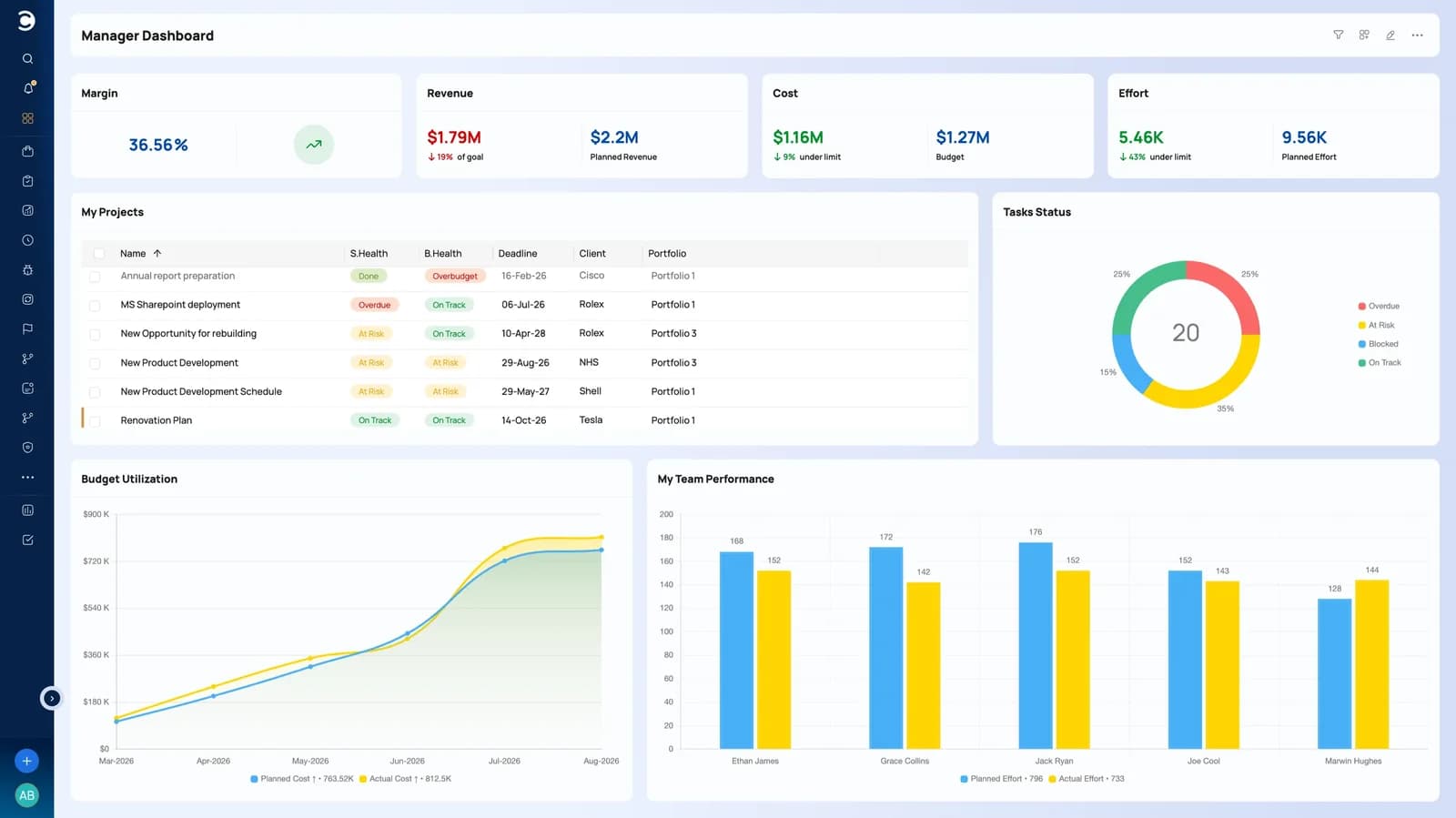
Portfolio management
Decide which projects deserve the capacity
Group projects into portfolios, score and rank new demand, set portfolio budgets, and read health across the whole set. Executives see the same numbers the delivery teams are updating, so investment decisions do not wait for a reporting cycle.
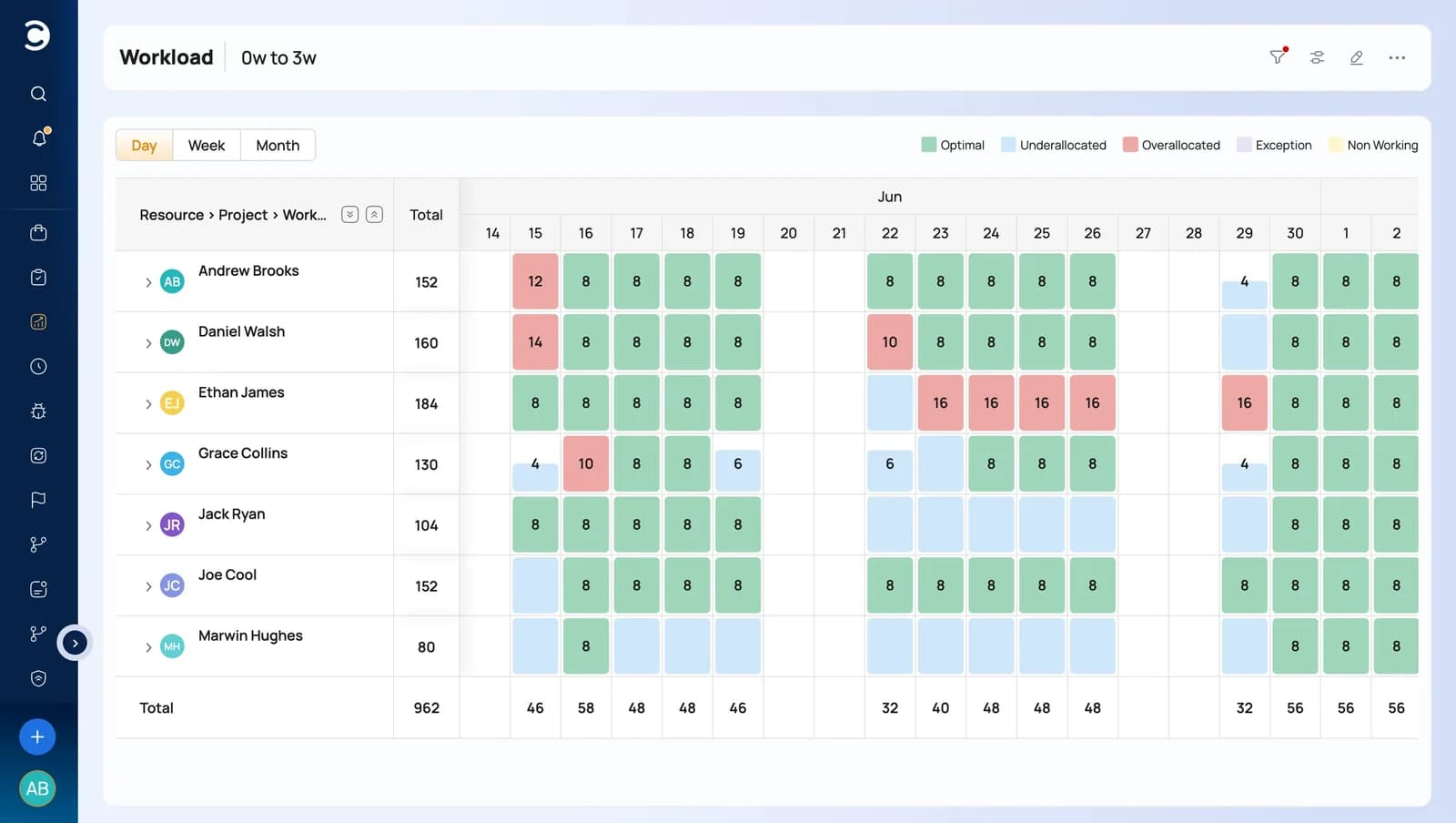
Resource management
See capacity before you promise it
One view of demand, availability and utilization across every project. Assign by role, skill and calendar, spot over-allocation as it happens, and answer “can we take this on” with a number rather than an instinct.
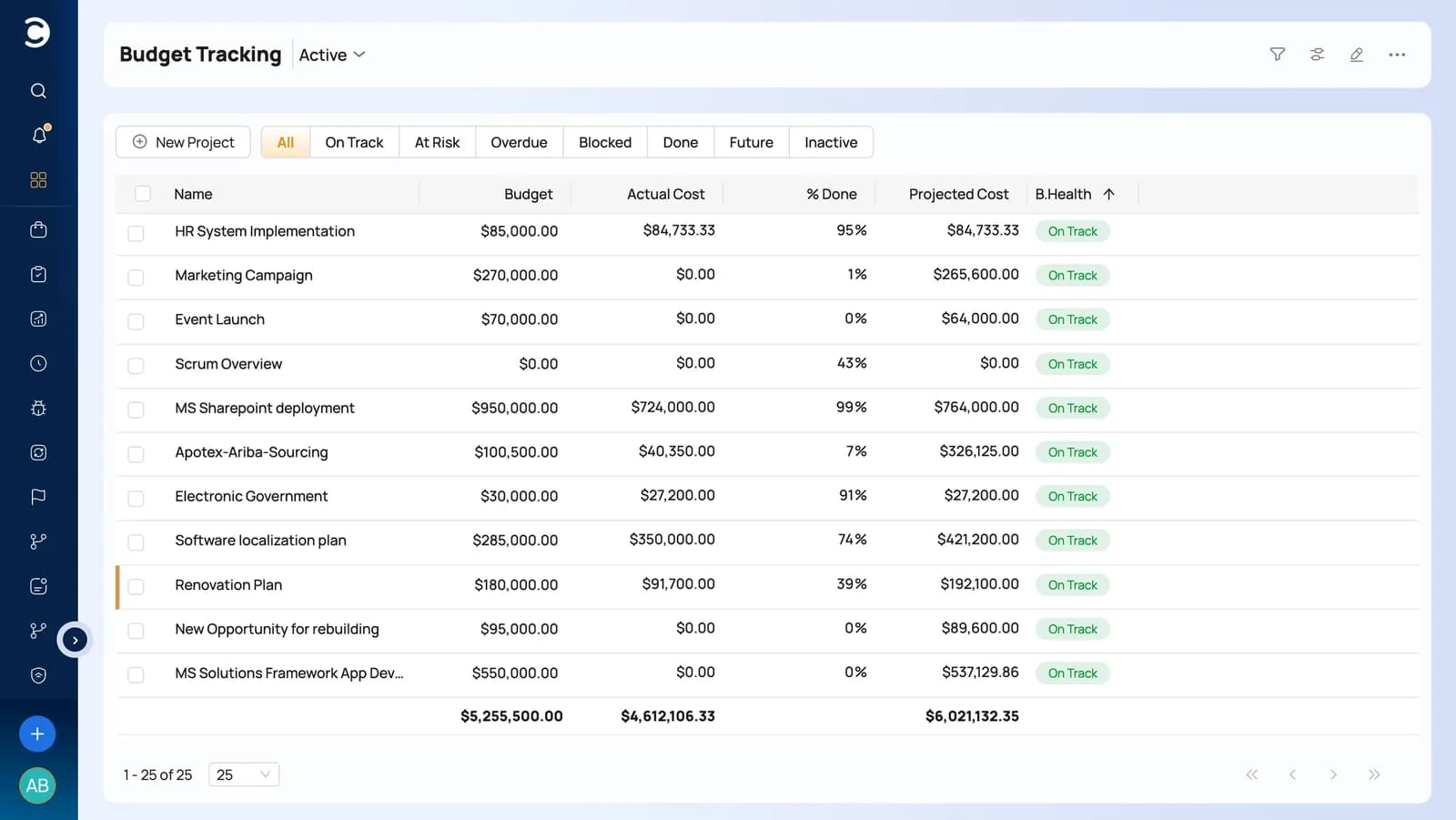
Project financials
The money lives on the plan
Rate cards, cost rules, expenses and budgets sit on the same record as the schedule, so forecast against actual updates as work is logged. Approved time and expense become invoices, and receivables stay attached to the project that earned them.
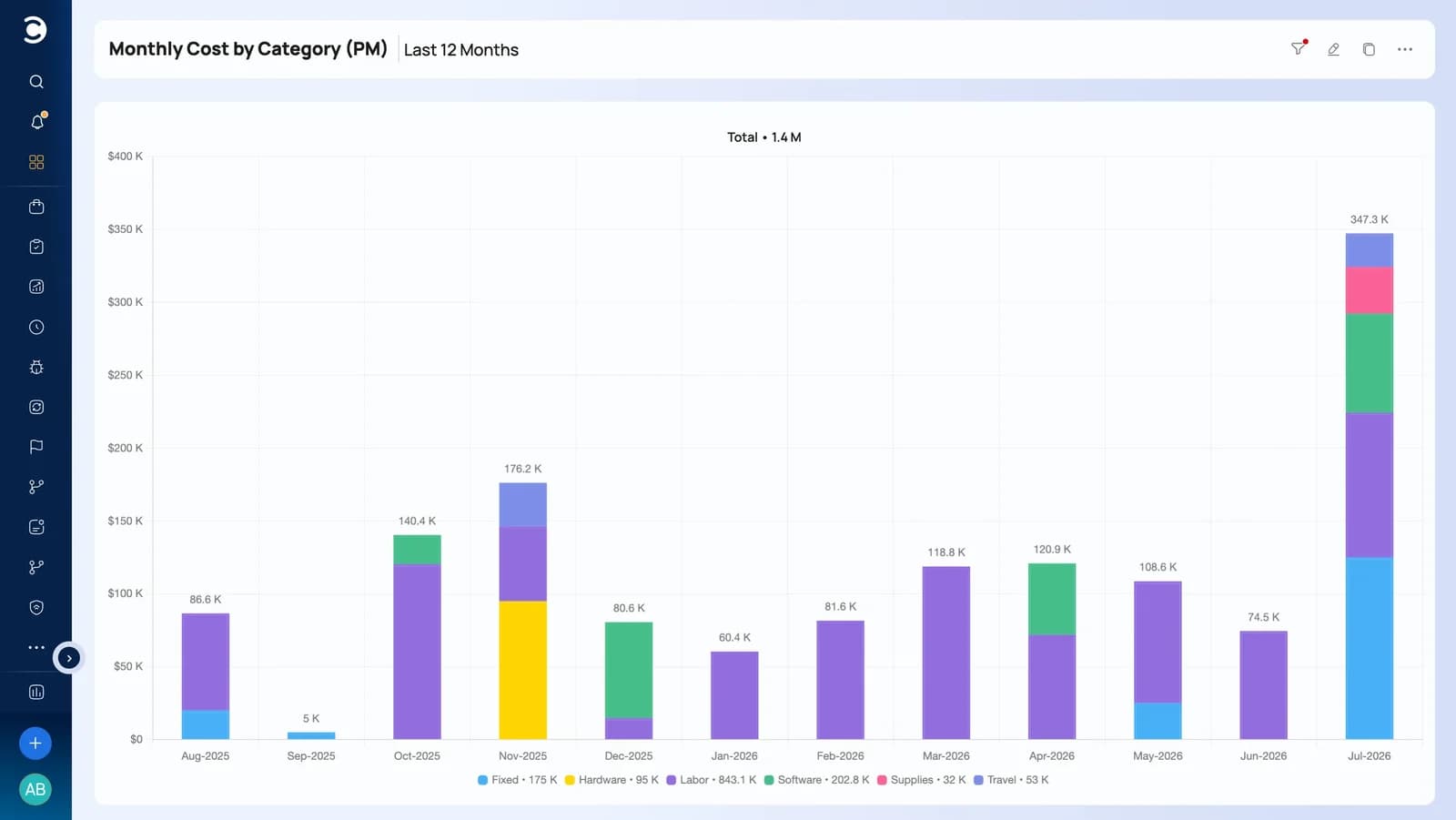
Reporting & analytics
Reports that are read, not rebuilt
Build dashboards and reports on any field in the system, schedule them to the people who need them, and drill from a portfolio number down to the task behind it. No exports, no separate BI model to maintain.
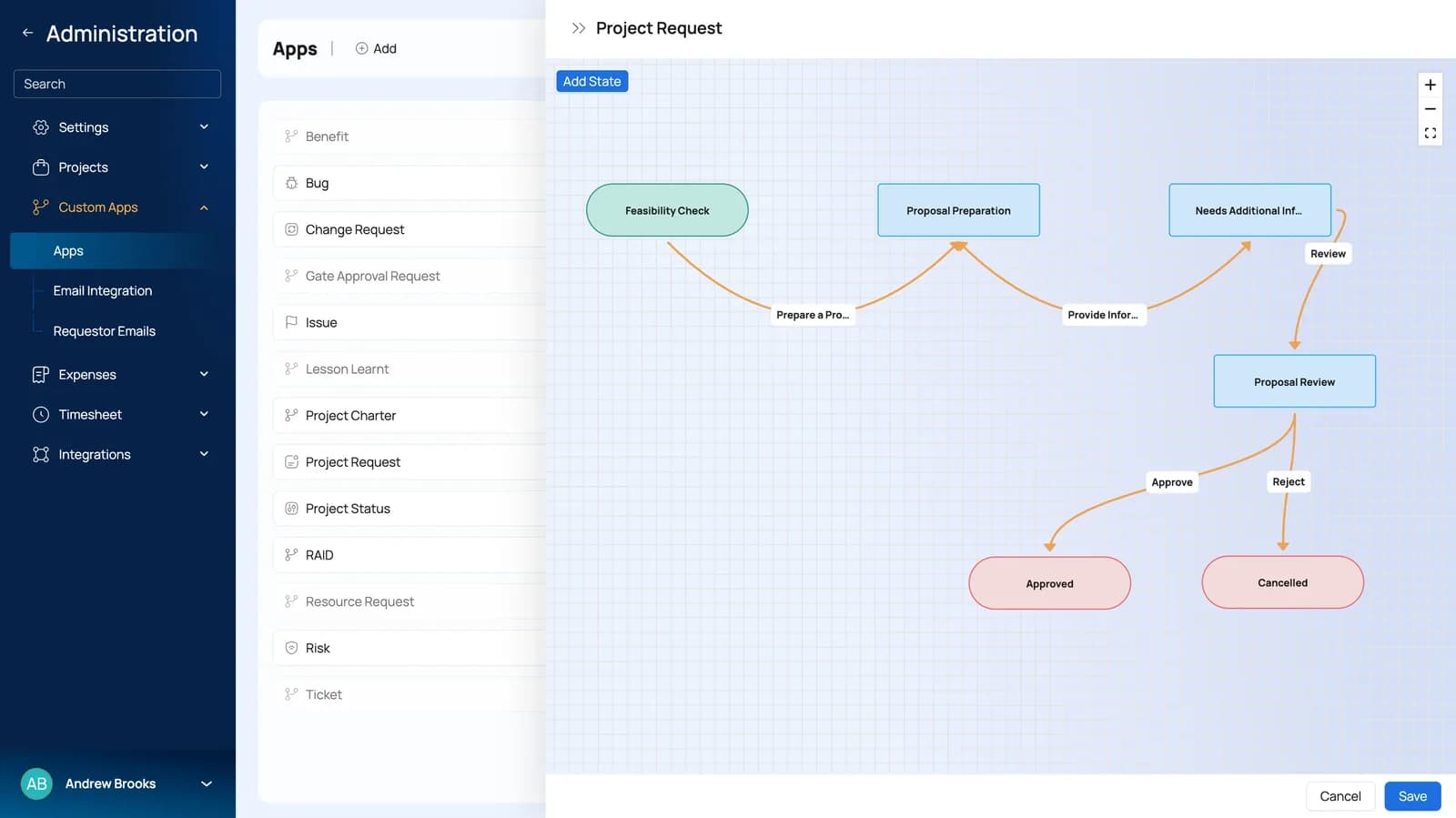
Workflow & customization
Configured to your process, not the other way round
Model your own intake, review and approval stages, automate the routine transitions, and add the fields your governance actually asks for - up to 1,000 of them, with custom apps for processes the product does not ship with.
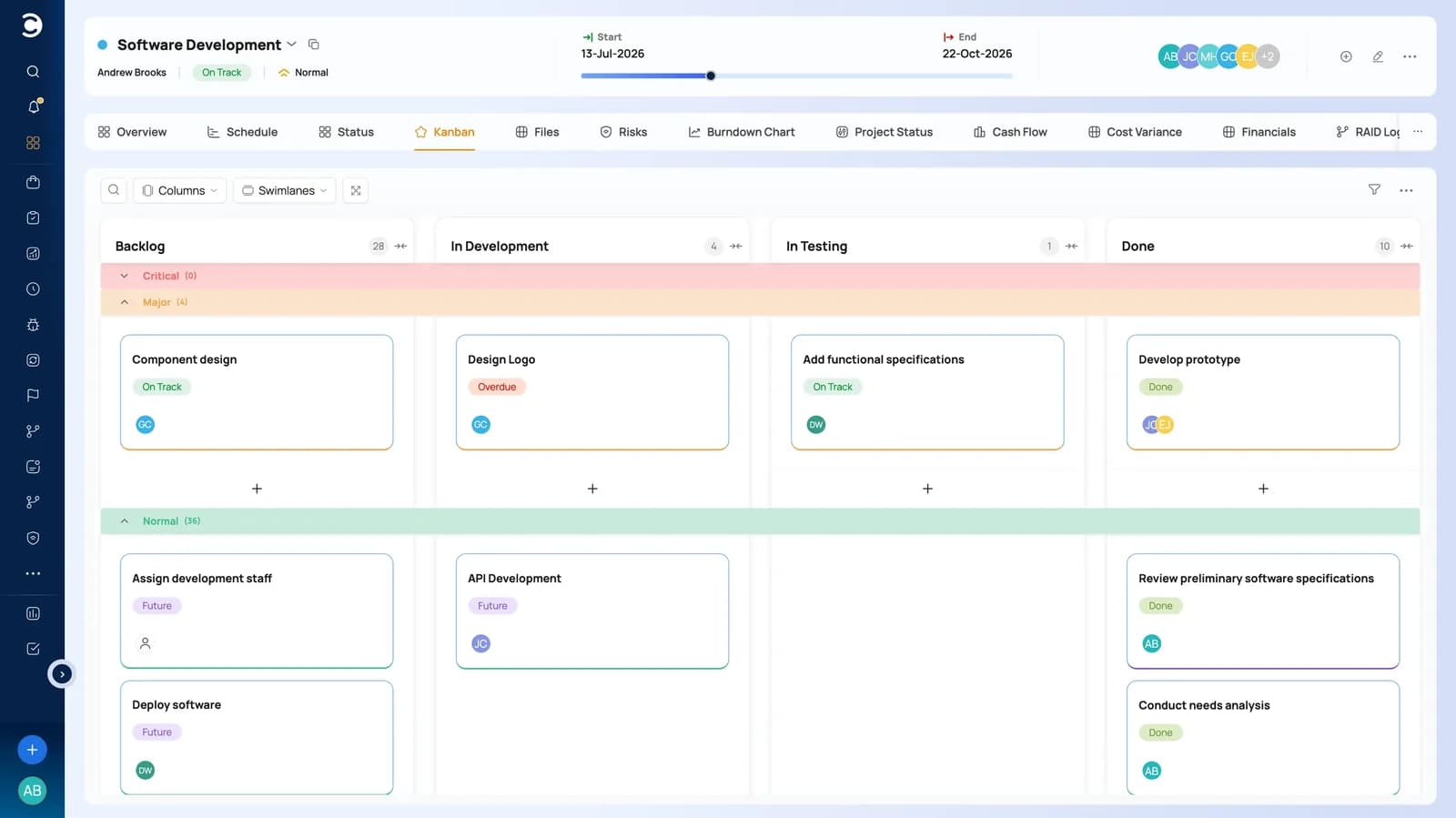
Collaboration & execution
Where the work is actually done
Task views and Kanban boards for delivery teams, discussions and files on the project record, timesheets for effort, and a free client portal when the work is billable. The plan updates because people worked, not because someone chased them.
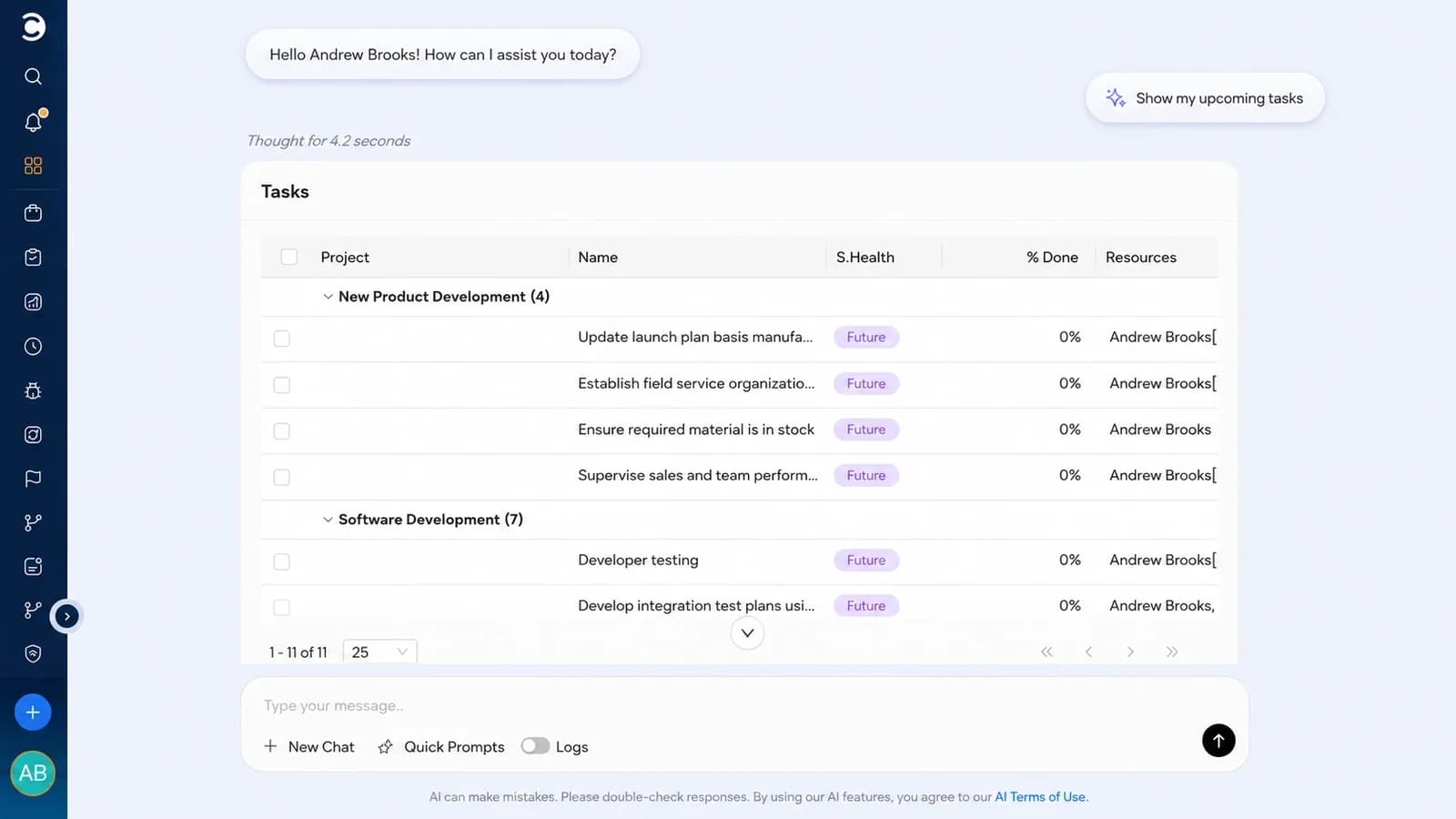
AI Project Intelligence
Meet LEX - decisions, earlier
More than an assistant. LEX analyzes your live project data to deliver real-time insight, actionable solutions, and recommendations from plain-English commands.
Customer success stories
Two teams that moved off Smartsheet
Both planned in Smartsheet and tracked money and resourcing in spreadsheets. Pick a company to see what the move changed.

When you are looking for a system, don't think that you have to utilize the leader in the industry just because they have the name. We fell into that hole several times before we found Celoxis. To be honest I had never heard of Celoxis before I started doing some web searches. You don't have to pay $50,000 or a $100,000 to find a really quality solution.

Switching
A switch you can run in phases
Existing plans come across, the Microsoft tools your teams already work in stay connected, and onboarding is guided, not left to your team.
Smartsheet integration
Your existing plans are the starting point
Bring plans in from Smartsheet and Excel, keep working alongside Microsoft 365, and connect the rest of your delivery stack through 400+ integrations and the REST API.
- Import plans, tasks and assignments from Smartsheet or Excel
- Microsoft 365 and Okta single sign-on
- Jira, Azure DevOps and QuickBooks for teams already on them
- REST API, webhooks and Zapier for everything else
 MS Project
 Excel
Excel Microsoft 365Plans, resources and financials in one platform
- 01
Evaluate
Trial with a real plan
Start the 14-day trial with sample data, then import one of your own plans. Judge the platform on work you recognize, not a demo dataset.
- 02
Configure
Match your own process
Set up portfolios, custom fields, security roles, rate cards and approval workflow so governance follows the process you already have.
- 03
Onboard
Get the PMO live first
Guided onboarding and data migration bring the PMO across, with templates and reports in place before the wider rollout.
- 04
Roll out
Add teams in phases
Move portfolio by portfolio, keeping Smartsheet available for detailed scheduling while the transition runs. Nothing has to move on one date.
Cloud or on-premise. Your choice.
Run Celoxis in our secure managed cloud, or host it on your own servers when data residency and internal governance decide the answer.
Celoxis Cloud
- Enterprise-grade infrastructure, performance & redundancy
- Encryption, automated backups & role-based access
- Done-for-you setup - live in weeks, not quarters
- Always on the latest release, zero maintenance
On-Premise
- Host on your own physical or private-cloud servers
- Full control over data residency & governance
- One-time perpetual license, transferable seats
- Ideal for regulated, defense & security-first environments
Customer proof
Rated by the reviewers enterprise buyers check first
A consistent top ranker across the major software review platforms, and used to run mission-critical portfolios worldwide.
 G2
G2 Capterra

 Gartner
Celoxis gives us real-time project status without depending on project managers to self-report. That visibility changed how we run our PMO.
Excellent features and genuinely responsive support. The reporting and dashboards give us the depth we need to manage global implementation projects.
Celoxis was built to run real projects. It changed how we work - our decision-making, resourcing, and reporting are all in one place now.
Frequently asked questions
Questions Smartsheet users ask
01How is Celoxis different from Smartsheet?
The scheduling model is deliberately similar - dependencies, calendars, constraints, critical path and baselines all behave the way your planners expect. The difference is everything around the schedule. Of the 22 capabilities compared above, Smartsheet covers 5 in the plan most teams buy; 11 need a higher plan or setup work, and 6 come from other products. In Celoxis all 22 sit in one platform, cloud or on-premise. Licensing varies by tenant, so compare against your own before deciding.
02Can Celoxis handle the same scheduling complexity?
Yes. All four dependency types - Finish-to-Start, Start-to-Start, Finish-to-Finish and Start-to-Finish - with lead and lag, within a project or across projects. Multiple work calendars per project and per resource, scheduling constraints, summary tasks, milestones and a multi-level work breakdown. Change a duration or a link and the whole schedule recalculates, with the critical path showing which tasks control the delivery date. Baselines sit on every plan, and variance is visible at project and portfolio level.
03Can we run multiple projects as a portfolio?
Yes - it's the main reason teams move. Group projects into portfolios, score and rank incoming demand, set portfolio budgets, and read health across the whole set with automatic RAG and what-if scenarios. The timeline stacks projects one below another, so phases, hand-offs and milestones line up across the portfolio instead of sitting in separate files. Executives read the same numbers delivery teams are updating, so investment decisions don't wait for a reporting cycle.
04How does resource planning work across projects?
Resourcing runs off the plan itself, not a spreadsheet beside it. Assign several people to the same task with individual allocations and see what those assignments do to effort, availability and workload. Calendars are per resource as well as per project - working weeks, shifts, holidays and one-off exceptions - so dates reflect when people can really work. Resource managers see capacity across every project, and what-if analysis helps decide which projects get that capacity.
05Can we migrate our existing Smartsheet plans?
Yes. Import plans from Smartsheet or Excel - tasks, hierarchy, dates, durations, dependencies, milestones and resource assignments come across intact, so nobody rebuilds a plan by hand. Most teams move in phases: trial with one of your own plans, configure portfolios, fields, roles, rate cards and approvals, bring the PMO across with guided onboarding and data migration, then add teams portfolio by portfolio. Smartsheet stays available for detailed scheduling while the transition runs. Nothing has to move on one date.
06Does Celoxis cover project budgets and costs?
Yes - budgets through to billing, in the same system as the plan. Track budgets, forecasts and actuals against the work, apply rate cards, and capture time and expenses against tasks so cost and margin update as delivery happens. Billing is a stage in the same lifecycle rather than a separate hand-off, which is where teams usually find leakage between approved work and what gets invoiced.
- ★★★★★4.6/5 on G2
- 500+ organizations, including NASA, Tesla & the Fortune 500
Ready to go beyond scheduling?
Bring the whole portfolio into one platform.
Start a free trial with sample data or one of your own plans, or ask for a demo built around your portfolio and run side by side with what you use today.
- 14-day free trial
- No credit card required
- Import your existing plan
- Cloud or on-premise