
Expense Workflow
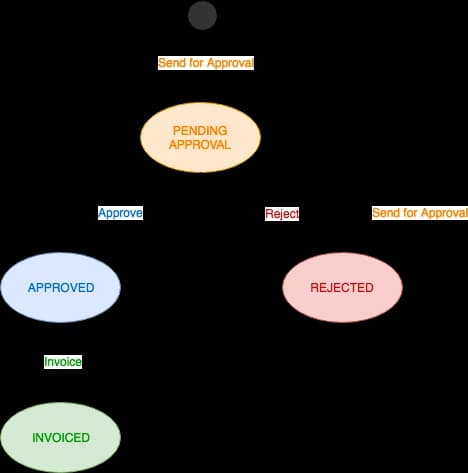
An expense in Celoxis passes through various states as shown below.
Submitted
Pending approval indicates that the expense has been submitted for approval.
- Anyone with Add Expense privilege can create an expense in this state.
Approved
Approved indicates that the expense has been approved by the project manager.
- Once approved, that expense cannot be edited by the submitter. However, anyone with the Approve privilege can make changes to the expense.
- Information from approved expense like cost and revenue are rolled-up to their respective work items and projects.
Rejected
Rejected indicates that the expense has been rejected by the project manager.
- The submitter is notified through an email.
Invoiced
Invoiced indicates that the expense has been marked as invoiced.
- Only expense marked as Billable can be invoiced.
- Anyone with Invoice privilege can invoice an expense.
- Once invoiced, the expense’s invoiced revenue are rolled-up to their respective work items and projects.