
Upgrading from 11.1 to 11.5
Download Celoxis v11.5
You can get the download link from our support team.
Backup your current installation
Backup your existing database and data directory. If the upgrade fails for any reason, the backup of your database and data directory will have to be restored.
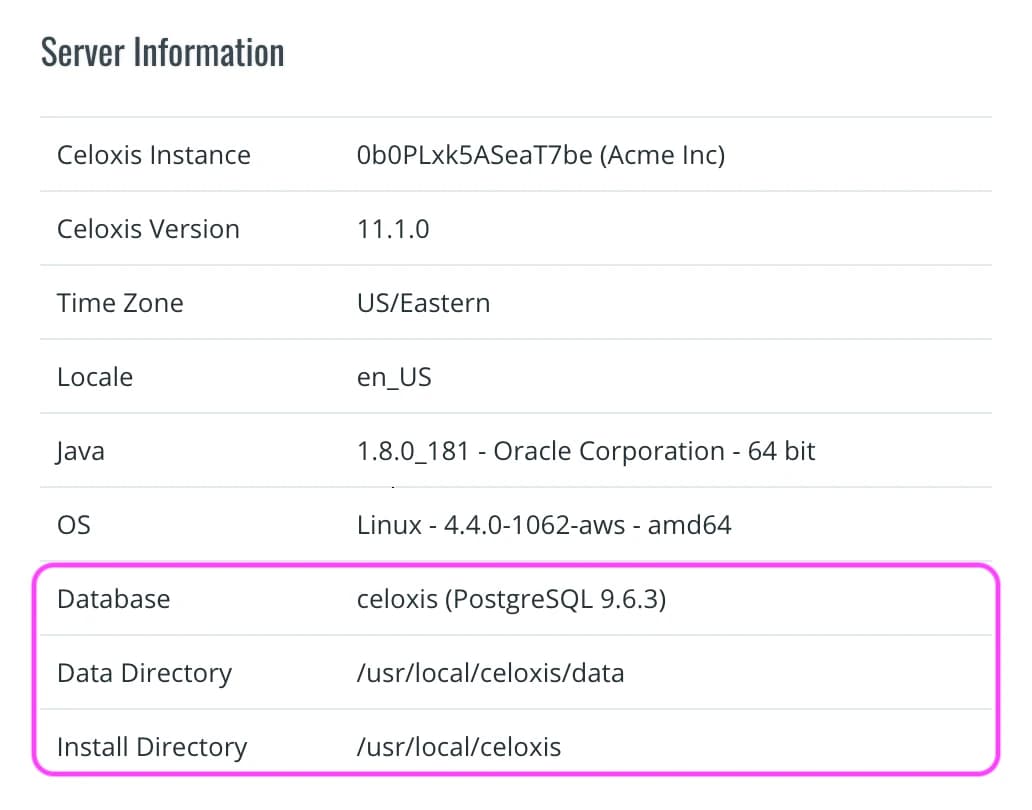
To find your install directory, database and data directory, navigate to AdministrationSite Settings and check the Server Information as shown below:
Stop the current version
- Stop Celoxis.
- If you have installed Celoxis as a Windows Service, uninstall it.
Start the upgrade
- Copy the downloaded
psa_11.5.x.zipfile into<Celoxis-Install-Dir>. - Unzip the
psa_11.5.x.zipfile. - You should now have a
psa_11.5.xdirectory inside<Celoxis-Install-Dir>. - Open a command prompt (terminal on Linux).
cd<Celoxis-Install-Dir>and then topsa_11.5.x.- Type: bin\startup.bat (bin/startup.sh on Linux).
- Open
http://<your-server-name>:8888/in your browser. - Choose the Upgrade option and follow the instructions to complete the upgrade.
- If you had installed Celoxis as a Windows Service, reinstall it.